Case study The studio previously booked appointments manually in a third-party provider's differently colored window. I freed the booking experience from that setup: the custom-coded, four-step wizard keeps guests in the brand's gold-and-plum world and schedules appointments automatically. The client Therapist Alexandra Szabó welcomes clients on Bécsi út in Budapest. In its own words, Klimessence Signature is built around physical regeneration, inner stability, and mindful presence – with ten treatments in three categories: Fohow therapy, facial treatments, and energy treatments. On the previous site, booking took place in a pop-up window from an external provider (minup.io), using different fonts and colors from those of the website itself. I replaced it with a custom booking system that stays within Klimessence’s gold-and-plum visual style throughout. 01 — The booking wizard I replaced the previous pop-up, which had a mismatched color scheme, so the current interface is now an entirely custom build instead of an external embed. The entire process takes just 4 steps in the wizard: first, the guest chooses from the 10 available treatments listed under Fohow Therapy, Facials, or Energy Treatments. If they select a 90-minute appointment, the screen immediately displays the available times in 90-minute blocks. In the third step, they enter their details; in the fourth, they review the summary and complete the payment. The time-slot engine adjusts the grid to the exact length of the treatment, so you never have to manually check whether requests overlap in your calendar. When a guest combines two services totaling, say, 80 minutes, the site automatically rearranges the grid, and the smallest time increment becomes 15 minutes. The engine schedules your day automatically so there is never an unused gap before the next guest arrives, while visitors only see times that are truly available to book. 02 — The confirmation process Example of a confirmed booking When the guest pays the card deposit through Stripe in the fourth step of the booking wizard, the system immediately gets to work behind the scenes. The exact treatment time is automatically added to Alexandra Szabó's Google Calendar the second the transaction is completed. For many service providers, this would mean transferring the details on paper or manually updating a separate calendar – that step is eliminated here: custom code records each appointment, permanently eliminating duplicate administration. At the exact same time the calendar entry is created, the system sends two emails: one to the guest and one to the therapist. The guest receives final confirmation on their phone immediately, completely replacing coordination calls and the uncertainty of waiting. Meanwhile, the therapist opens their own app to find a complete, up-to-date schedule, with the background process having already put everything in place. 03 — What it’s built on Many service providers pay monthly for a third-party calendar system they can’t modify. Off-the-shelf booking plugins can handle payments and calendar syncing, but they don’t let you customize the scheduling logic (so that a 90-minute treatment and a combined 80-minute treatment use different time intervals) or match every detail of your brand. That’s why I built this system entirely from scratch using 9 standalone PHP modules – independent, custom code components – so appointment booking and the pass-purchase feature also run directly on your website. When Alexandra Szabó checks the submitted information in the morning, the interface opens only after she enters her password; if anyone else clicks the link, the system immediately sends them to a blank login screen. Visitors using their phones quickly give up on typing into a hard-to-use form with tiny text, and you lose paying clients. I ran this wizard through an automated accessibility audit (WCAG 2.2 AA standard), which it passed cleanly, with no critical or serious errors. In practice, this means that if a potential client has low vision and navigates with a keyboard or screen reader instead of a mouse, they can book an appointment just as easily. 0 paid booking plugins in the system. You don’t pay third-party companies every month for off-the-shelf software because your website handles the work on its own. The booking wizard, time-slot engine, Stripe integration, Google Calendar sync, and pass purchases are all built into your own code. The result When visitors select a treatment, the four-step booking process unfolds in the same dark plum and gold color palette as the homepage. The booking interface uses the site's elegant Bodoni typefaces, while the embedded process blends completely into its surroundings. Guests scroll through available appointments and enter their details while remaining in the brand's carefully crafted space throughout. This makes booking feel less cold and software-driven. Even through the screen, the process offers a preview of the uninterrupted calm that awaits during the actual treatment. Design system The site is built around Klimessence gold (#E3C08D) and dark plum (#1A1423). Headings use Bodoni Moda, while body text uses Manrope. Bodoni Moda Heading typeface · 400 · 700 · 800 The quick brown fox jumps over the lazy dog Manrope Body typeface · 400 · 500 · 700 The quick brown fox jumps over the lazy dogKlimessence Signature
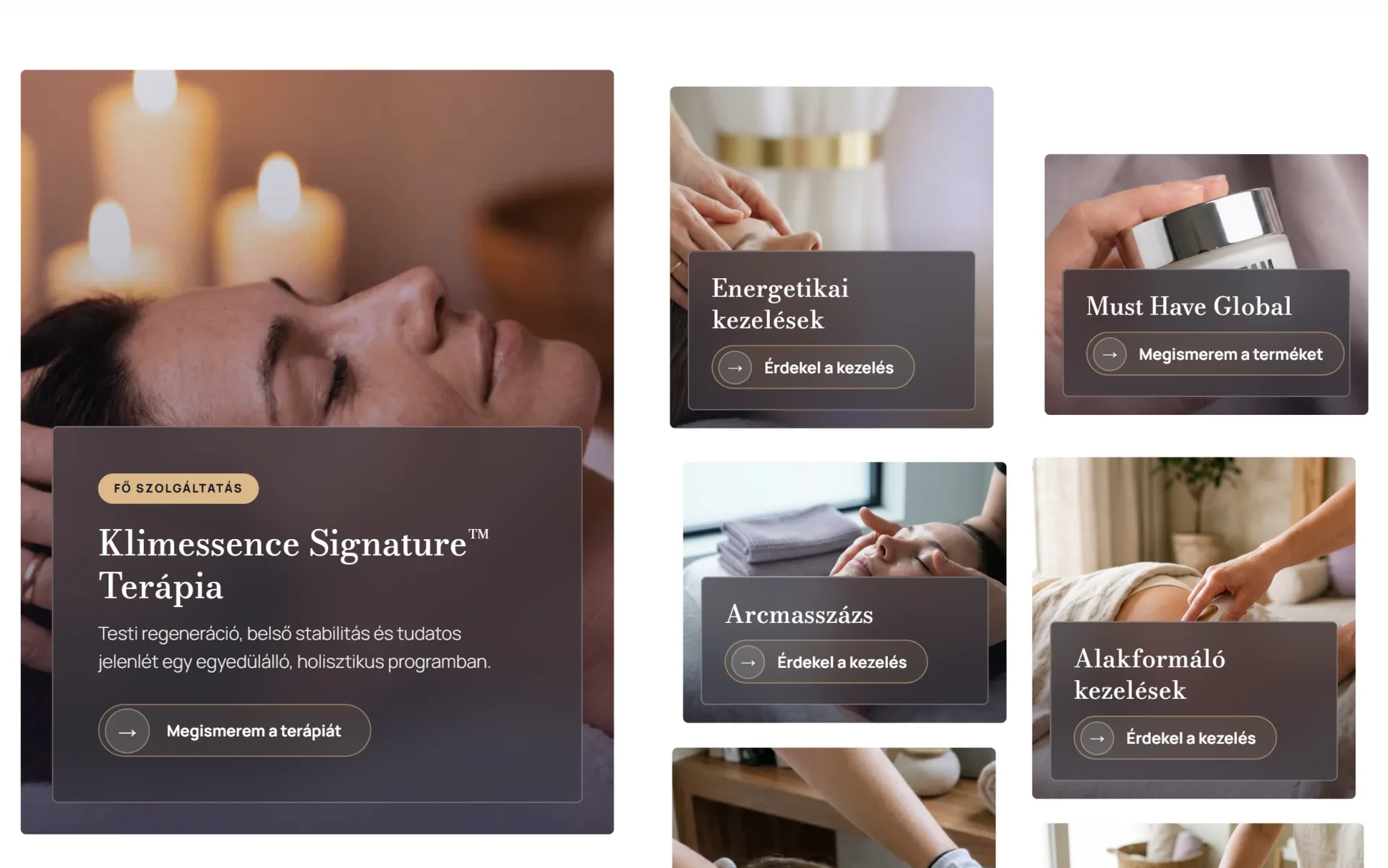
Regenerates the body, rejuvenates the face, balances energy.
A custom-coded booking system that fills your calendar without gaps.
The moment payment goes through, all the administrative details fall into place.
One closed system handles bookings with no monthly fees.
Guests book an appointment without ever leaving the salon's world.
The brand's gold and typefaces.
#E3C08DKlimessence gold
#1A1423Dark plum